


Krystal
4.6730.00 Reviews
App Specs
- Version
- 2.2
- Updated On
- License
- Free
- Downloads
- 100,000+
- Developer
- The Krystal Company
- Categories
- Food & Drink
- Platform
- Android
Screenshots
 Analysis by AppCompare
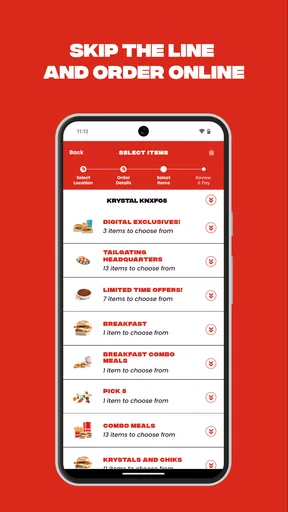
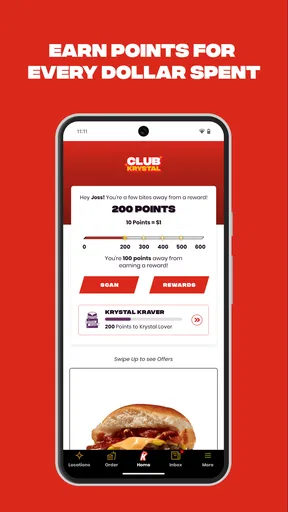
I usually judge a restaurant app by what happens when I am hungry, in a hurry, and trying to order without turning the process into a small project. Krystal fits that test reasonably well. It is a free Food & Drink app from The Krystal Company, built around ordering, rewards, and access to special perks rather than trying to replace every food service in one place. I found it most useful when I already knew I wanted Krystal and needed a quicker way to arrange the visit.
The app is aimed at Everyone, which makes sense for a restaurant tool that may be used by different people in the same household. Still, an age rating does not automatically mean every part of a shared phone experience is equally convenient. The practical questions are who is signed in, who is placing the order, and who will be collecting or paying for it. Those boundaries matter more than the simple act of installing the app.
How Krystal works in a shared household
When several people share a meal, I find it helps to agree on one person to manage the account and place the order, while everyone else confirms their choices before checkout. That simple division makes rewards easier to track and reduces mix-ups over the active basket. Next, I’ll look at how to keep that routine clear when the household’s ordering habits change.
A realistic dinner-time use case
Imagine one person is leaving work while another family member is already at home. The person on the way can open Krystal, choose the meal, and organize the order before arriving. That is a more useful scenario than casually browsing a menu with no plan. It gives the household a clear handoff: one person prepares the order, while the person collecting it knows what was selected.
I would not treat the app as a shared family inbox, though. The app is designed around the individual order experience, so coordination still depends on the people using it. Before placing anything, I would confirm the restaurant location, pickup timing, and the exact contents of the basket in a message or conversation. That small step prevents the common household mistake of two people ordering separately because each assumed the other had handled dinner.
For a shared device, the cleanest arrangement is to let one adult manage the account and order flow. Other household members can help choose food, but I would avoid leaving the account open on a phone that anyone can use without checking. The convenience of a saved session is useful, yet it also makes accidental orders or confusion more likely when several people share one device.
What setup is actually worth doing
My advice is to install Krystal before you are standing in a parking lot with a hungry passenger. Take a moment to sign in, look through the ordering path, and understand where rewards or perks appear. Doing this calmly makes the first real order less stressful, especially if another person is waiting for you to decide.
Worth Reading Before You Choose

EA SPORTS FC Mobile 26 Is a Bigger Football Game, but It Takes Time

Flipboard Shows What News Apps Must Do Beyond the Feed

Switching to Android Auto Means Rethinking Your Driving Routine

Google Calendar Makes a Crowded Week Easier to Manage

Ludo King Makes the Most of the Minutes Between Plans

Baby Panda World Brings Quick Play to Modern Phones, but Its Game Library Feels Busy
I would also establish a simple household rule: the person who starts the order remains responsible for checking it before submission. That includes reviewing customizations, the selected location, and the intended collection method. The app can make ordering more direct, but it cannot resolve a disagreement about whether someone wanted one item or another.
There is a useful distinction between installing the app for occasional browsing and setting it up as the household’s regular ordering tool. If you only visit Krystal rarely, you may not want to build your routine around rewards or keep another restaurant account active. If Krystal is already a frequent choice, the account can make repeat visits feel more organized. I see the strongest value when the same person orders often enough to remember how the app works.
Rewards are helpful, but they need an owner
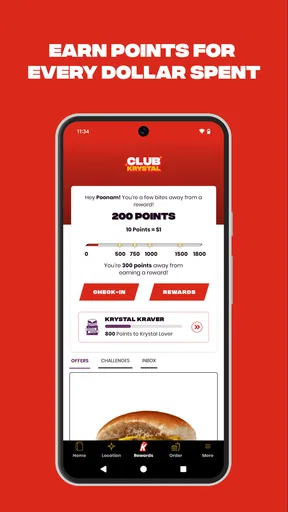
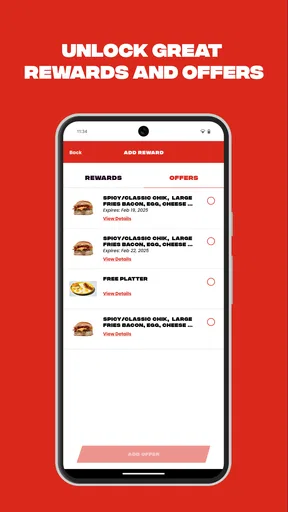
The rewards side is one of the reasons to use the app instead of ordering in the usual way. The store summary focuses on earning rewards and unlocking exclusive perks, so this is more than a digital menu. In my experience, reward programs work best when one person in a household keeps track of them rather than several people assuming they are all earning toward the same goal.
That does not mean a family cannot use the app together. It means expectations should be clear. If one person’s account is used for an order, that person should be the one checking the reward progress and available benefits. A shared phone can blur that responsibility, particularly when someone else opens the app and starts a new order without noticing which account is active.
I would also avoid changing the order simply to chase a perk. A reward is only worthwhile if it matches what the household already intended to buy. Otherwise, the app can encourage a more complicated or less suitable order than the original plan. Used sensibly, rewards are a small bonus on top of an order you wanted anyway, not a reason to spend extra time or money.
Coordinating pickup without overcomplicating it
The app’s main strength is the connection between choosing food and getting the order moving. That is especially convenient when the person ordering is not the person who will eat immediately. For example, I can imagine a parent arranging food while another adult collects it, provided both people agree on the location and timing beforehand.
The weak point is the human handoff. I would not assume that opening the app on a second phone automatically gives everyone the same context. The safer approach is to tell the collector the order details directly and make sure they know which location to visit. If the order is for several people, repeating the key items aloud may feel unnecessary, but it is faster than discovering a missing item after returning home.
This is also where Krystal differs from a broad delivery marketplace. A marketplace may combine many restaurants and offer one place to compare them, while Krystal is focused on its own ordering experience. That narrower scope is a benefit when I already want Krystal because I am not distracted by unrelated restaurants. It is a disadvantage when the household is still deciding what to eat or wants to compare delivery options, fees, menus, and availability across several businesses.
Why a dedicated restaurant app can beat the usual alternatives
Ordering at the counter remains the simplest choice for someone who is already inside the restaurant and does not care about rewards. A browser can also be enough for a one-off visit, particularly if the customer dislikes installing separate apps. Krystal earns its place when repeat ordering and account-based benefits matter more than keeping the phone uncluttered.
Compared with a telephone order, the app gives me a clearer way to review what I selected before finishing. That reduces the chance of mishearing an item, although it does not remove the need to check the final basket. Compared with a delivery service, it is more focused on the restaurant itself, but it may be a poorer fit for households that rely on one delivery app for many brands or need a single shared delivery history.
There is a trade-off here that is easy to miss: a restaurant-specific app can feel faster precisely because it does less. I do not get the broad comparison layer of a marketplace, but I also do not have to search through unrelated listings when Krystal is already the decision. For regular customers, that focus is convenient. For occasional visitors, it may not justify another account and another app.
Age context and trust on a family phone
Because the app is rated Everyone, it is suitable in the general sense for a broad audience. I would still keep account ownership with the person who understands the household’s ordering and payment arrangements. A younger family member can help select food, but an adult should review the order before it is submitted if the phone or account is shared.
This is not about treating the app as risky by default. It is about separating access from responsibility. A child, guest, or visiting relative may know how to navigate a menu, but they may not know whether the order is for pickup, which location is correct, or whether a reward should be used now or saved. The app does not need to be difficult for this boundary to be sensible.
I would be particularly careful with a phone that stays signed in. Convenience features are valuable when one person uses the device, but shared access changes the calculation. If several people use the same handset, checking the active account before beginning an order becomes part of the routine. That single habit helps prevent one person’s reward activity or order history from being mixed up with another person’s plans.
What the current app profile suggests
Krystal has an average rating of 4.6 from around 6,100 ratings, with roughly 730 written reviews, and it has passed 100,000 installs. Those figures suggest that the app has found a meaningful audience, while the written feedback is large enough to show that people are engaging beyond a handful of downloads. I would read that as encouragement, not as a guarantee that every device or every ordering situation will feel perfect.
The app was released on September 2, 2021, and its current version is 2.2. It requires at least OS 10, so compatibility is worth checking before planning to use it on an older phone. This matters in a household where one person has a newer device but the shared tablet or backup phone has not been updated in a while.
The version requirement also affects coordination. If the main account holder uses a current phone but the person collecting the order relies on an older shared device, I would keep the order information available through a direct message or spoken confirmation rather than assuming both devices will offer the same experience. That is a practical precaution, not a criticism of the app itself.
Small habits that make the experience smoother
First, I recommend deciding who owns the order before anyone opens the app. This sounds obvious, but it prevents a shared-device session from becoming a group of half-finished choices. One person can gather requests, another can suggest changes, yet one person should perform the final review and submission.
Second, I would use the rewards area as a planning aid rather than checking it only after the meal is chosen. If a perk is relevant to the visit, knowing that early may influence the order naturally. If it is not relevant, ignoring it can keep the process quick. This avoids the trap of repeatedly rebuilding the basket at the last moment.
Third, I would separate “what the household wants” from “what the app makes easy.” A child may choose an item because it is prominent on the screen, while another family member has a dietary preference or a different portion in mind. Reading the complete order back to everyone is the best protection against that kind of interface-led decision.
Fourth, I would avoid using a shared device for several simultaneous orders. Even without any unusual technical problem, two people editing the same session can create uncertainty about which basket is current. If separate orders are genuinely needed, assigning one device or one person to each order is clearer than trying to manage them together.
Where Krystal is not the right choice
I would skip Krystal if my main goal were comparing many restaurants, arranging a mixed-brand meal, or relying on a delivery marketplace for one consolidated checkout. The app’s focused design is its advantage for Krystal customers, but it naturally offers less value to someone who has not decided on the restaurant.
I would also hesitate if I only visit occasionally and do not care about rewards or exclusive perks. Ordering directly in person may be quicker in that situation, especially when I am already near a location. Installing a dedicated app is not automatically better just because it is free; the benefit has to outweigh the extra account and the need to remember another ordering routine.
Finally, households that cannot agree on account ownership may find the experience frustrating. The app can support a shared meal plan, but it does not replace household communication. If everyone wants separate control over orders and rewards, separate personal arrangements are likely clearer than one perpetually open account on a communal phone.
My household verdict
I see Krystal as a practical companion for people who already choose Krystal regularly and want ordering, rewards, and special perks in one focused place. It is free, its Everyone rating makes it approachable for a broad audience, and its strongest use case is straightforward: one responsible account holder organizes a known meal while the rest of the household confirms what they want.
My recommendation is more measured for occasional customers. The app is not a universal food-ordering solution, and its value drops if you mainly compare restaurants or depend on delivery aggregation. But for a household that visits Krystal often, the dedicated experience can reduce repeated decisions and make reward tracking easier, as long as everyone understands which account is active and who has the final say.
The best way to use Krystal is to treat it as a shared ordering tool with one clear owner, not as a communal account that everyone edits freely. With that boundary in place, I found the app more useful and less confusing. It does what a restaurant-specific app should do: keep the path from choosing Krystal to coordinating the meal relatively direct, while giving regular customers a reason to return to the app instead of starting from scratch each time.
Pros
- Clean
- modern interface that is easy to navigate
- Fast performance when browsing available content
- Useful search tools help locate items quickly
- Regular updates can improve stability and add features
- Works well for users who prefer a simple experience
Cons
- Some features may require an account or personal information
- Content availability can vary by region or device
- Advanced customization options are limited
- Occasional loading delays may appear on slower connections
- The app may use noticeable battery during extended sessions
FAQs for Krystal
What is Krystal and what can I use it for?
Krystal is an app designed to provide users with a focused digital experience, although its exact features may depend on the version and platform available. Before downloading, review the app’s store description carefully to confirm whether it matches your needs. Check the supported devices, required permissions, account requirements, and whether the main tools are available for free or require payment.
Is Krystal free to download and use?
Krystal may be available as a free download, but some features, content, or services can require in-app purchases, a subscription, or another form of payment. I recommend checking the pricing section on Google Play or the App Store before installing it. Also review renewal terms, trial periods, and cancellation instructions so you understand the total cost before activating any premium option.
Is Krystal safe and trustworthy to install?
You should download Krystal only from an official store or a verified developer source. Before installation, check the developer name, recent user reviews, update history, privacy information, and requested permissions. Be cautious if the app asks for access that seems unrelated to its purpose. Keeping your operating system updated and avoiding modified APK files can further reduce security and privacy risks.
What permissions and personal information does Krystal require?
The permissions required by Krystal can vary according to the features you use and the operating system on your device. Review access to items such as notifications, storage, camera, microphone, location, contacts, or account information before accepting. The privacy policy should explain how collected data is used, stored, shared, and deleted. Denying optional permissions may limit certain functions.
Which devices support Krystal, and what should I do if it does not work properly?
Compatibility depends on the current Android or iOS version, device model, available storage, and the app release installed. Confirm the minimum operating-system requirements on the official download page before installing. If Krystal crashes, loads slowly, or fails to open, update the app, restart your device, check your connection, clear temporary data where supported, and contact the developer if the problem continues.


